



Compliance News You Need To Know
Courtesy of Proven Backups' HIPAA Compliance Officer, Dawn Meglino
Have you added new applications since set up?
Many of you have come to rely on Proven Backup's unique and powerful service offering as your offsite medical records storage solution. Our proactive, hands-on approach assures that you meet the demands of data backup and HIPAA regulations.
Now is a great time to perform a survey of your practice's software applications and let us know of anything NEW that has been added.
While we constantly monitor the status of your backups and manage them, if new software applications are added we need to be notified so we can add them to the backup jobs. This will ensure that information is safely and securely stored.
If you think you may have some new applications that are not being backed up, please contact us by emailing support@provenbackup.com and put "New Application Added" in the email subject. We will contact you to help, or you can always call 877-972-2258)
We are proud to be the HIPAA compliant backup company to support Professinal Data System's PracticeProtectionMD
Professional Data Sustems, Inc. has pulled together all of the expert HIPAA services you need to meet the complexities of the process. What makes the PracticeProtectionMD service unique is experienced, certified staff to walk you through the complicated process, combine that with the best in HIPAA compliance technology and a compliance management portal and you have a one-stop HIPAA compliance solution. PPMD is priced monthly and includes hardware maintenance, backup, support and a toll-free Help Desk.
"How to avoid a HIPAA violation 101"
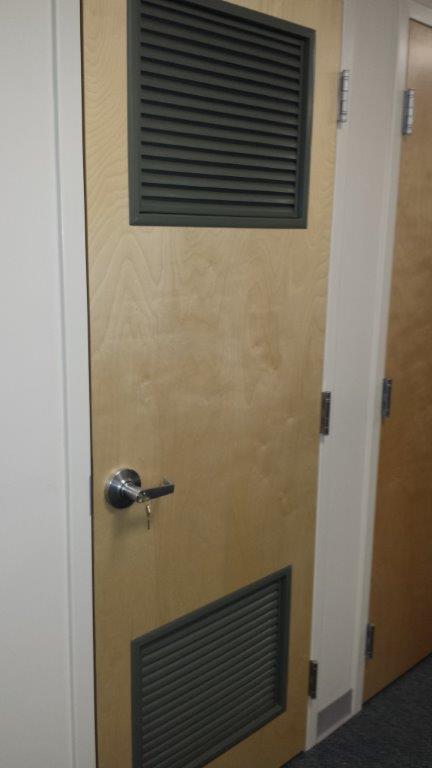 Take the keys to the locked server room out of the door!
Proven Backup offers compliant data backup for eClinicalWorks software.
Although, Medisoft doesn't offer a backup service, Proven Backup offers compliant data backup for all versions of Medisoft.
Have Medisoft software and want to know what backup?
HIPAA Technical Safeguards You Need to Have
Our partner, Professional Data Systems supports hundreds of clients and can support you too.
Read, "HIPAA Security Rule requirements: Technical safeguard review" from HealthITSecurity
Top 10 (but not in a good way)
Every one of these breaches were completely avoidable if basic security practices had been followed, meaning these were not high-end sophisticated attacks, but rather lapses of judgment and sound application of security... read the article
Highlights:
- All of the top 10 largest breaches listed on the Department of Health and Human Services' Office for Civil Rights' "wall of shame" website involved lost or stolen unencrypted computing devices or storage media. Overall, theft and loss of unencrypted devices have accounted for approximately half of all major data breaches appearing on the federal tally.
- "The top 10 breaches demonstrate the importance of encryption for protecting data in motion or at rest," says security expert Brian Evans of Tom Walsh Consulting. "Since encryption is now provided either out of the box or through add-on products, this no-cost or low-cost solution can significantly reduce the likelihood of breaches from occurring. Ensuring encryption is adequately implemented is a fundamental step all organizations should be taking."
- Many organizations lack an effective, ongoing risk assessment process and fail to consistently identify internal and external threats and vulnerabilities or systematically implementing basic controls, Evans says. "They have unassigned ownership and accountability over security and compliance requirements. As a result, they lack compliance with applicable security regulations, standards and requirements."
To our clients from Healthcareitnews.com:
Although these may sound redundant, failure to conduct a complete security risk analysis leaves your practice wide-open to audits, fines and the worst PR when publicized.
Not only is the Risk Analysis a requirement as per HIPAA (45 C.F.R. § 164.308(a)(1).), it is the most proactive step to ensure your organizations security and compliance. Read about the 6 Biggest HIPAA Breach Fines
Evidence of HIPAA compliance tips for healthcare providers
From Healthitsecurity.com.
According to healthcare attorney Susan Miller, detailed evidence of HIPAA compliance and going beyond just the black letter HIPAA rules will be important factors when the Office for Civil Rights (OCR) makes its HIPAA audit rounds this fall. Miller said that OCR has been talking about evidence of compliance since 2009, when it first released the HIPAA Omnibus Rule Notice of Proposed Rule Making (NPRM).
In Miller’s estimation, evidence of HIPAA compliance includes the following documentation:
- HIPAA Privacy, Security and Breach policies, procedures and related documents, updated to the Omnibus Rule additions and changes; reviewed yearly; updated as necessary
- Breach Plan, plus yearly role playing and update
- Training Plan, plus training and training material
- Communications Plan, plus meeting agenda, minutes
- Disaster Recovery Plan, plus yearly role playing, and update
- Audit and Monitoring Plan, reviewed yearly
- Governance documentation
- Yearly, internal HIPAA audit, documentation
- Yearly Security Risk Analysis/Assessment, documentation
Data breach results in $4.8 million HIPAA settlements
Two health care organizations have agreed to settle charges that they potentially violated the Health Insurance Portability and Accountability Act of 1996 (HIPAA) Privacy and Security Rules by failing to secure thousands of patients’ electronic protected health information (ePHI) held on their network. The monetary payments of $4,800,000 include the largest HIPAA settlement to date.
The U.S. Department of Health and Human Services (HHS) Office for Civil Rights (OCR) initiated its investigation of New York and Presbyterian Hospital (NYP) and Columbia University (CU) following their submission of a joint breach report, dated September 27, 2010, regarding the disclosure of the ePHI of 6,800 individuals, including patient status, vital signs, medications, and laboratory results.
NYP and CU are separate covered entities that participate in a joint arrangement in which CU faculty members serve as attending physicians at NYP. The entities generally refer to their affiliation as “New York Presbyterian Hospital/Columbia University Medical Center.” NYP and CU operate a shared data network and a shared network firewall that is administered by employees of both entities. The shared network links to NYP patient information systems containing ePHI.
The investigation revealed that the breach was caused when a physician employed by CU who developed applications for both NYP and CU attempted to deactivate a personally-owned computer server on the network containing NYP patient ePHI. Because of a lack of technical safeguards, deactivation of the server resulted in ePHI being accessible on internet search engines. The entities learned of the breach after receiving a complaint by an individual who found the ePHI of the individual’s deceased partner, a former patient of NYP, on the internet.
In addition to the impermissible disclosure of ePHI on the internet, OCR’s investigation found that neither NYP nor CU made efforts prior to the breach to assure that the server was secure and that it contained appropriate software protections. Moreover, OCR determined that neither entity had conducted an accurate and thorough risk analysis that identified all systems that access NYP ePHI. As a result, neither entity had developed an adequate risk management plan that addressed the potential threats and hazards to the security of ePHI. Lastly, NYP failed to implement appropriate policies and procedures for authorizing access to its databases and failed to comply with its own policies on information access management.
NYP has paid OCR a monetary settlement of $3,300,000 and CU $1,500,000, with both entities agreeing to a substantive corrective action plan, which includes undertaking a risk analysis, developing a risk management plan, revising policies and procedures, training staff, and providing progress reports.
For information about the basics of HIPAA Security Risk Analysis and Risk Management, as well as other compliance tips, visit: http://www.hhs.gov/ocr/privacy/hipaa/understanding/training
The New York and Presbyterian Hospital Resolution Agreement may be found here.
The Columbia University Resolution Agreement may be found here.
From USA Today, "Homeland Security: Don't use IE due to bug"
Professional Data Systems recommendations you use another browser until a fix is released. If you continue to use Microsoft's Internet Explorer, be sure not to click on any unusual links.
"Microsoft confirmed Saturday that it is working to fix the code that allows Internet Explorer versions 6 through 11 to be exploited by the vulnerability. As of Monday morning, no fix had been posted, however we expect to receive an update on the fix shortly. Our staff intends to deploy it when it is tested and ready." Read the article
From Network Doctor (used with permission from HP Technology at work)
The following 7 good habits take only minutes to learn and are easy enough to incorporate into your daily work life, AND PROTECT ePHI:
1. Create strong passwords: Passwords are usually the first, and sometimes only, protection against unauthorized access. They are the keys to your online kingdom, so keep these guidelines in mind.
2. Lock your computer screen: It only takes a few seconds to lock your PC. Just press the Ctrl+Alt+Delete keys and then select the option “Lock this computer.” For your smartphones and tablets, use the passcode feature, as these devices are just as vulnerable as your PC.
3. Secure mobile devices from loss: While mobile devices such as smartphones, tablets and laptops are valued for their portability, this convenience can become a security risk. It’s easy to lose or misplace these devices.
4. Protect data on mobile devices and removable media: Mobile devices and removable media, such as USB drives, enable us to easily share and transport information, but can lead to the loss or misuse of data. Although it’s important to protect the actual devices themselves from loss.
5. Identify URLs before clicking: Simply stated: think before you click. A malicious website that looks legitimate is a common method used by criminals. However, verifying the real destination is easy—just place your cursor over the displayed URL, and the true destination will reveal itself with a small pop-up. Don’t click if it looks suspicious.
6. Use public Wi-Fi safely: Public Wi-Fi is riskier than corporate or home Wi-Fi because you can’t determine its setup and security features. So, take extra precautions when using it.
7. Think before you post to social media: Social media provides a convenient, fun way to stay in touch with friends and family. But be cautious about what you post. Understand both personal and business risks, and always comply with your company’s rules for business conduct.
Two significant fines follow failure to heed "encryption needs" as outilned in HIPAA Security Risk Analysis reports.
Excerpted from from HCPRO.com
Your IT company needs to offer encryption for your portable devices
HHS released a statement stressing the need for encryption, citing two recent OCR settlement agreements that totaled nearly $2 million as examples of the dangers posed by unencrypted devices in healthcare. Unencrypted computers and mobile devices pose a significant security risk for organizations because patient PHI is incredibly vulnerable in the event that one of these devices in stolen or hacked.
The OCR’s $1,725,220 resolution agreement with Concentra Health Services, a national healthcare company, for potential HIPAA violations stemming from the theft of an unencrypted laptop highlights the importance of encryption.
An OCR investigation revealed that during several risk analyses Concentra identified that its lack of encryption was a security threat. Although the organization took steps to encrypt its devices, its efforts were inconsistent and incomplete. Concentra failed to implement sufficient policies and procedures to detect and correct security violations by failing to execute appropriate risk management measures to reduce the lack of encryption, according to the resolution agreement.
Similarly, OCR agreed to a $250,000 monetary settlement with Arkansas-based QCA Health Plan, Inc., following an incident involving the theft of an unencrypted laptop containing PHI from a workforce member’s car. The health plan began its effort to encrypt its devices following the breach, but failed to comply with a multitude of HIPAA Privacy and Security Rule requirements from April 2005 to June 2012, according to the HHS statement. Much like Concentra, QCA Health Plan also failed to implement policies and procedures to prevent, detect, contain, and correct security violations, including conducting a thorough risk assessment, according to the resolution agreement.
Encryption is the best defense for covered entities and business associates, Susan McAndrew, OCR’s deputy director of health information privacy, said in the statement.
Office for Civil Rights: HIPAA audits to be narrower in scope
Details of the second phase Department of Health and Human Services (HHS) Office for Civil Rights (OCR) HIPAA audits are beginning to filter through and healthcare organizations would be smart to pay attention to OCR’s audit plans.
As healthcare organizations and business associates (BAs) prepare for these fall 2014 audits (no specific timeline has been set), there are a few items to consider. First, as opposed to the 2012 audits that involved KPMG, the upcoming phase of OCR audit efforts will use both OCR regional and headquarters staff. Though the OCR doesn’t have specific numbers to share on how its representatives will conduct the HIPAA audits, the OCR spokesperson said, “[u]pcoming audits will be narrower in scope, assessing a more limited set of compliance requirements than audits conducted by KPMG in 2012.”
Next, it’s no secret that OCR will be honing in on healthcare organizations’ risk analysis strategies and programs... read the whole article
Proven Backup does not use Open SSL
You may heard that a significant security exposure in OpenSSL called “Heartbleed” was disclosed last week. OpenSSL is a protocol used by many heavily visited websites such as Amazon, Google and Facebook, allowing users to log in. It compromises security for many systems that connect over the Internet.
We have reviewed our systems and consulted with vendors to ensure that our systems are not vulnerable.
From HealthITSecurity.com
Leon Rodriguez – Director, Office for Civil Rights (OCR)
Some have at times questioned where exactly OCR fine penalty money goes beyond just the idea that it goes toward further auditing. Rodriguez stated that OCR will be leveraging its civil monetary penalties even more than it has already. OCR now has authority from the Office of Management and Budget (OMB) to carry civil monetary revenue across fiscal years, which presents OCR the opportunity to plan how it can best utilize those revenues for auditing activities and analysis. Rodriguez said that OCR had a $38 million budget for this year, in addition to the $4 million it collected in civil penalties, and it plans on asking for a higher budget for fiscal year 2014-2015. “We’re just about done with the [2014] audit evaluation and we’re in the process of hiring specialized audit personnel, and they’ll work with contract auditors,” Rodriguez said.
So, how will the 2014 audits be different than the 115 pilot audits that were conducted in 2012? For one, according to Rodriguez, OCR will not use 200 points of auditing again. He wants to reach more organizations annually in a targeted manner. Even though OCR had a multi-million dollar appropriation from the HITECH Act to conduct the pilots, Rodriguez wants to use the funds in a more widely-distributed way for the 2014 audits. “This way, we can see change year-by-year, depending on where we’re seeing vulnerabilities, and one focus in the audits will be on risk analysis,” he said. Read the full article
Our partner, Professional Data Systems offers a complete HIPAA Risk Analysis Service from certified HIPAA Compliance Trained staff - but if you want to take on the responsibility of doing it on your own you can. The important thing is that you NEED to perform the Analysis and remediate any risks that you find.
HHS unveils new HIPAA security tool
Aimed to help smaller providers with risk analysis process
March 28, 2014
Officials at the HHS' Office for Civil Rights -- the division responsible for enforcing HIPAA -- have said risk analysis tops the list for where healthcare entities often make their biggest HIPAA misstep. Thus, in efforts to provide further guidance, OCR teamed up with ONC to develop a new security risk assessment tool designed to help practices conduct and document a risk assessment in a methodical, organized way.
Healthcare providers can download the application, which can also generate a report that can be passed on to auditors, officials say.
As part of the HIPAA privacy and security rules, organizations handling protected health information must regularly review administrative, physical and technical safeguards they have in place to protect the security of the data. By conducting these risk assessments, healthcare providers can identify potential weaknesses in their security policies, processes and systems, OCR officials point out. Risk assessments can also help providers address vulnerabilities, potentially preventing data breaches or other adverse security events.
Conducting a security risk assessment is a key requirement of the HIPAA Security Rule and a core requirement for providers seeking payment through the Medicare and Medicaid EHR Incentive Program, federal officials note.
"Protecting patients' protected health information is important to all healthcare providers, and the new tool we are releasing today will help them assess the security of their organizations," said Karen DeSalvo, MD, national coordinator for health information technology, in a March 28 statement. "The SRA tool and its additional resources have been designed to help healthcare providers conduct a risk assessment to support better security for patient health data."
Susan McAndrew, deputy director of OCR's division of health information privacy, said she and her team were pleased to have worked with ONC on this project. "We believe this tool will greatly assist providers in performing a risk assessment to meet their obligations under the HIPAA Security Rule," she said in a press statement.
The SRA tool's website contains a user guide and tutorial video to help providers begin using the tool. Videos on risk analysis and contingency planning are available at the website to provide further context.
When Healthcare IT News spoke with then OCR chief Leon Rodriguez last fall, he said the biggest mistake HIPAA-covered entities and business associates make with regards to HIPAA is the "failure to perform a comprehensive, thorough risk analysis and then to apply the results of that analysis."
To date, more than 30 million people have had their protected health information compromised in a HIPAA privacy or security breach, according to data from the U.S. Department of Health and Human Services. HIPAA-covered entities have handed over some $18.6 million to settle alleged federal HIPAA violations, with $3.7 million of that just from last year. And those don't count state fines.
Just this week, Stanford Medicine, together with its business associate Multi-Specialty Collection Services were required to hand over $4.1 million in a class action settlement after violating California's medical privacy law after MSCS wrongfully posted the PHI of some 20,000 patients to a student website for nearly a year.
101: Security Risk Analysis
watch the video
Outsourcing 'allows me to focus'
'We're not in the IT business; we're in the healthcare business'
Denis Tanguay, chief information officer for Central Maine Healthcare, says his workload has "probably quadrupled," in the past few years.The rigors of getting ready for Stage 2 meaningful use attestation, along with the tall order of transitioning to ICD-10, have him and his 70-person IT staff "buckling under the pressure," says Tanguay. "We're working very hard."In the years since HITECH, the to-do list has grown considerably.
"We went from planning upgrades that probably happened once or twice a year, to several times a year, with a lot of rigorous testing involved in between," he says.On top of all that, Central Maine's "challenges are a little bit out of the norm," says Tanguay of the system, which comprises three hospitals, two long-term care facilities and 85 physician practices."We are not only upgrading all of our systems for meaningful use and ICD-10, but we decided to consolidate and change some product lines at the same time," he says. "We moved from some McKesson products on the financial side to Lawson; we moved from McKesson billing to Cerner billing, and then we moved a non-Cerner module to Cerner, as part of our consolidation efforts to move more toward a single vendor platform."The combination of regulatory requirements and infrastructure upgrades – to say nothing of foot-dragging vendors – mean Tanguay and his team are "sweating it out," he says. "We're scrambling on both fronts. I'd love to hear that ICD-10 is going to be delayed a little bit because Stage 2 is a handful."In short, anything that could take some work off their plates is much welcomed.
More critically, it "allows me to focus," he says. "My CEO has a line: 'We're not in the IT business; we're in the healthcare business.' This allows me to focus more on making sure that we're focused on the hospital."
Tanguay says the flexibility and scalability afforded by this set up has been a boon, enabling easier software upgrades, quicker response time and greater system stability. Data security and disaster recovery procedures are other benefits."We use CareTech essentially as an insurance policy," says Tanguay. "They have already blazed those trails and made sure that whatever we're going to be using has already been tested, what versions of firmware and software work well.
"Central Maine Healthcare makes use of the service in several ways, from "field engineers that help us deal with some of the user calls that are coming in to new service requests: PCs, keyboards, software installations. They help us with that but they also have folks back in the shared data center that manage our big-iron equipment," he says."We have a lot of systems, don't get me wrong: We still have 400 servers in our location; we have our PACS and several other systems that exist locally," says Tanguay.
"But outsourcing "allows us to focus on those little systems, keep those running and focus on your core business: providing healthcare."And, of course, meeting meaningful use requirements and prepping for ICD-10.So far, MU readiness is "going pretty well," says Tanguay, who, when we spoke back in February, was just getting ready to upgrade the Cerner system for Stage 2.
There's been foot-dragging on the part of other vendors, however: "GE Centricity is lagging, they haven't released their version yet that's Stage 2 ready, so we're sweating it out a bit."We're planning on attesting in July," he says. "Most of our vendors have released updates for Stage 2 and ICD-10. One vendor has not and that's got us a little worried right now. It could hold up our attestation and cost us some dollars. That's worrisome.
"In the meantime, "having good projects managers is key," says Tanguay. "My CEO asked me the other day which of my directors was my first lieutenant. It's the project managers. They're the ones making sure that I'm getting the projects done. I've got a full-time person focused on making sure that everything it happening."Compliance with the rules of Stages 1 and 2 is challenging enough, he says. Then there are surprise "intermediary rules," like the 2015 edition EHR certification criteria proposed by ONC in February. "It's challenging; just when you think you know what the goal is, they move it a little bit."It's not easy, but it's necessary work."I think the pace is a little challenging, we're trying to get all of this done at once," says Tanguay, "but I think it's stuff that needs to happen. This is good for us."
HIPAA Law and EMR/EHR Backup Companies - the difference is an on-staff HIPAA Compliance Officer
Proven Backup helps healthcare providers to establish and implement procedures to create and maintain retrievable exact copies of EMR/EHR patient data.
But unlike typical backup providers,Proven Backup has a dedicated HIPAA/HITECH Compliance Officer who works with healthcare practices to ensure IT security directives and electronic data confidentiality laws as set forth by HIPAA/HITECH are upheld at all times and with all data sources.
- Our Compliance Officer has an in-depth understanding of HIPAA/HITECH regulations and collaborates with various departments to develop and offer IT Risk Analysis
- Proven Backup is the ONLY data backup company who solely services the healthcare industry - we are experts in HIPAA Compliant Backup - it's all we do.
Providers ramp up meaningful use.Nearly $21 billion in incentive payments received.
(from Healthcare IT) ORLANDO | February 24, 2014
Nearly 90 percent of eligible hospitals have received an EHR incentive payment, according to figures shared by officials from the Centers for Medicare & Medicaid Services on Monday at HIMSS14. And while eligible professionals (EPs) haven't yet approached that threshold, they are making impressive progress. Elizabeth Holland, director of the Health IT Initiatives Group in CMS' Office of E-Health Standards and Services, reported that about 60 percent of Medicare EPs are meaningful users of EHR systems.
In total, over 340,000 Medicare and Medicaid EPs have received an EHR incentive payment, and nearly $21 billion has been paid out, she said.That's an impressive amount, but, she cautioned, the agency is aware of its fiduciary responsibility. "We've done a lot of post-pay audits," she said."Now our audits have shifted to be pre-pays."
Audits of providers that have gone through Stage 1 revealed that the top reason for EPs not passing a payment audit is that they do not have documentation to support the attestation numbers entered into the system. "You would be surprised by the number of people who do not maintain that information," he said.
EPs often fall short in their security risk analysis, he noted. "Many people do not know what they're supposed to do and many others do not perform one. Still others identify what their issues are within their system or practice, but they fail to put together a remediation plan."
Yahoo Says Dected Hacking Attempt on Email Accounts
If you are using Yahoo email within your practice or to communication ABOUT, WITH OR TO your patients you are in breach of HIPAA requirements.
Practices MUST use HIPAA Compliant Email. We recommend Professional Data Systems' HIPAA Compliant email product: More information on this product
Read the Reuters Article: http://www.reuters.com/article/2014/01/31/us-yahoo-hack-idUSBREA0T21H20140131
You Need to Have a Contingency Plan in Place
As per HIPAA, it is a requirement to have a Contingency Plan in place, share with all staff and review regularly, and ensure your practice is prepared in the event a disaster occurs. Follow the link to an easy to use "game" to help you with planning:
We recommend taking this test to remind owners, security officers and staff the importance of a Contingency Plan.
Did you know Proven Backup is the offsite data backup provider for PAGNY
When the largest Physicians Affiliate Group in New York serving six New York City partner hospitals and health centers needed a healthcare IT provider to navigate the these “turbulent times in healthcare; they chose Professional Data Systems
When Professional Data Systems needed to provide PAGNY with HIPAA Compliant Offsite Data Backup, they chose Proven Backup! http://pagny.org
Patient Data at Risk from Poor Processes
"...Data vital to the business and near-term clinical operations should be backed up to remote data centers, allowing for fast access and protecting the data from extreme weather events or other disasters that could wipe out onsite servers..." Read the full article from HealthCare IT News
From HCCA: A Compliance and Ethics Newsletter
Every organization, its programs, and workforce have standards to meet. There are also standards for compliance and ethics programs. If those standards are met, it can make a tremendous difference. Read more
We'd like to congratulate,
Dawn Meglino our in- house HIPAA Compliance Officer for achieving the accreditation of
Certified HIPAA Privacy Security Expert (CHPSE)!
The CHSPE credential signifies that Dawn is an expert in overall HIPAA compliance and is able to evaluate whether policies and procedures are HIPAA-compliant and ensure that practices she analyses are taking every possible step to protect privacy and security of protected health information.
Stolen Laptops and Unencrypted Data Put Healthcare Organizations at Risk
While mobile computing is a fast growing trend in the healthcare industry, so is the risk of losing important patient information contained on mobile devices. Recently it was reported that a laptop computer containing information on 30,000 patients at the University of Texas M.D. Anderson Cancer Center was stolen, one of the largest of its kind at a Texas Medical Center institution. Among the stolen information were names and Social Security numbers. READ MORE>
Hospitals Need Reliable Data Backup Solutions to Maintain Security, Confidentiality, and Compliance
The challenges of unreliable backup and recovery for a hospital’s IT infrastructure is a growing concern. Tape and disk methods have proven to be unstable in protecting a hospital’s large amount of vital information, causing major setbacks. In fact, most recently, Emory Healthcare in Atlanta announced that backup disks containing approximately 315,000 patient records had gone missing from a storage locationat Emory University Hospital. Click here to read the full article.
Online Backups Prove to be Safer than Physical Media
The vast majority of HIPAA violations are due to the physical loss of a hard drive, laptop or some form of backup media. In her recent article, Dr. Marion Jenkins confirms this assertion. See http://www.physicianspractice.com/blog/content/article/1462168/1836969.
Stolen laptop (1.22 million records breached)
Lost backup tapes (1.06 million records breached)
Stolen hard drives (1.02 million records breached)
Data Backup - an Essential Component to Successful EMR Implementation
How to Protect your Electronic Medical Records and Stay off the HHS Wall of Shame
According to the Department of Health and Human Services, nearly 7.9M health records have been exposed with theft reported as the number one reason for breached data. Lost electronic or paper records, as well as improper disposal, unauthorized access or use, and human error are now starting to play greater roles. What is worse is that the trend is growing. <READ MORE
Backing up your Advanced Data Systems Medic Rx Software
Data backup is Only as Good as its Technical Support
Proven Backup is the only online backup service which includes proactive, hands on backup management. Our experienced medical IT technicians continuously analyze all backup logs, and ensure your backups are always working and error-free.
-
We can, with your guidance, perform the initial setup of Proven Backup.
-
If there’s a failure, our technicians research and fix the issue. Some companies sell you software that informs you of the failure and expects you to address the issue yourself.
-
If there’s a need for data restoration, we actively facilitate the restoration process.
-
Proven Backup automatically performs all necessary housekeeping tasks such as obsolete data file removal, data integrity checking, user storage information rebuilding and log file cleanup.
9/11 Threats – What it Means for Your Practice
Earthquakes, Hurricanes, and Tornadoes– OH MY!
<READ MORE
Ten Things to Look for in an Offsite Backup Provider
Recommended Backups for Your NextGen Server
- Before performing the backup, first you must verify that you are connected to the correct NextGen database and environment. A detailed process for this is documented in NextGen’s White Paper – “NextGen® Database SQL Server Backup” (attached).
- Once this has been verified, the backup process is slightly different for MS SQL 2005/2008 vs. MS SQL 2000. A detailed process for both SQL versions is documented in NextGen’s White Paper – “NextGen® Database SQL Server Backup” (attached). Your healthcare facility should backup the NextGen database on a daily basis.
HIPAA Law and Backups
Since the Health Insurance Portability and Accountability Act of 1996 (HIPAA), and then the Health Information Technology for Economic and Clinical Health (HITECH) Act in 1999, healthcare practices are required to implement contingency plans for securing patient information at all times. Contingency planning objectives include disaster recovery, electronic data storage and emergency operations procedures. <READ MORE
Recommended Backups for Your eClinicalWorks Server
posted May 4, 2011
If your healthcare facility is using eClinicalWorks EMR software, there are several data sources which need to be backed up to ensure your medical records are safe. If you are not certain this data is being backed up, please contact Proven Backup or eClinicalWorks to ensure these key data sources are being backed up:
Increasing EMR/EHR adoption dictates greater need for secure, easy to use, offsite data backup processes
Despite early resistance, physicians, hospitals, and healthcare clinics are now beginning to implement EMRs (electronic medical records) into their practices and some of the first government HITECH act incentive checks have been issued. Several survey results show physician usage of EMR nearing 50%, and industry experts believe rapid adoption and upgrading activities in coming years. <READ MORE